In short
|
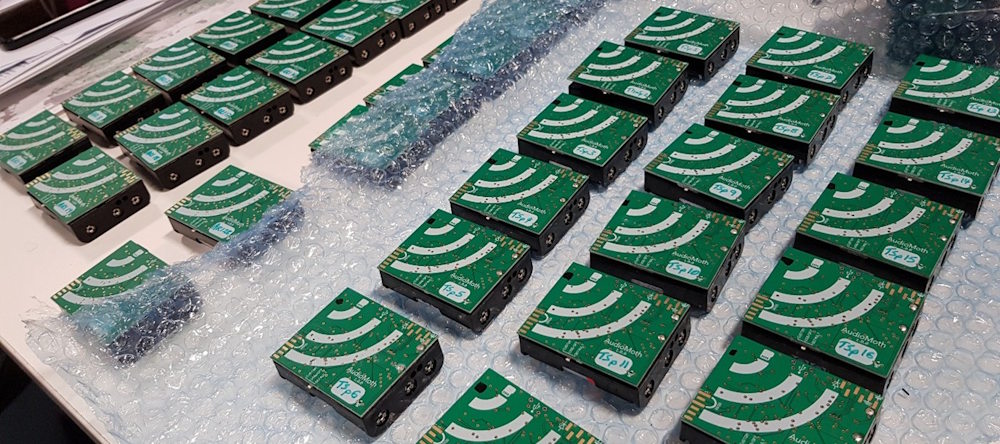
Audio moths prepared for the field (ARI).
Why your settings matter
ARI has developed software to help identify species from acoustic field recordings. To make the most of this new technology, there are some survey practices that will help you make the most of your acoustic recordings. The settings listed here will give the Arthur Rylah Institute Sound Analyser (ARISA) the best chance to successfully identify species in the most efficient way. As the volume of acoustic data that needs processing grows, efficient practices are increasingly important.
Recommended recorder settings
Sampling rate
Standard survey sampling rate/frequency: 48kHz
Bat surveys sampling rate/frequency: 384kHz, with a minimum of 192kHz
A recording made at 48kHz provides a maximum audible frequency of 24kHz, which is slightly higher than a human ear can hear. This gives a full acoustic spectrum from the field recordings, captures what we can hear and creates an ideal acoustic record at the time of recording. Additionally, providing the AI models with as much information as possible will help with their detections. Even if your target species calls at a lower frequency, recording at a higher sampling rate will provide the AI models more information for their application.
Our software is designed for 48kHz recordings. Whilst it will work with other sampling frequencies, we have found optimal model performance comes from recordings made at 48kHz.
If users are recording for bats we recommend 384kHz recording frequency, with a minimum of 192kHz.
Gain settings
Recommended setting: lower/standard gain as recommended by the manufacturer
High gain settings can pollute the recordings with static and can also cause issues with the automated detection software. If you are unsure, please test the recorders and listen to the test recordings to ensure they sound as ‘normal’ as possible.
Field placement
Directional placement of recorders can help provide better audio recordings. If possible, avoid placing recorders at sites close to high energy beaches, roads or waterways with frequent engine noise.
Should a recorder be placed near a ‘noisy’ environment, directing the recorder away from the noise source will help to reduce the background level of noise. Placing a recorder in an exposed location with strong prevailing winds will also reduce the quality of recordings.
Preparing your data
Checking your recorders
Before deploying your audio recorders in the field, we strongly recommend you:
- Set your automated recording schedule and test it for a day or two to ensure that it is working as intended.
- Listen to a random selection of your data (before and after deployment) - recordings should be clear and free from static or other recorder anomalies such as squeals and ticks.
- Please also consider pre- and post-deployment scheduled recordings and privacy concerns before sharing your data.
Organising your data
Automated acoustic recordings can generate a significant amount of data. It is vital that users consider how they are going to organise their data upon retrieval.
We recommend:
- Each site is setup as a folder; if using multiple recorders at a single site, each recorder should have its own subfolder.
- Folder naming should be free from non-alphanumeric characters except underscores (‘_’, ‘-’ or ‘.’).
- Do not use apostrophes, quotes, question marks, dots, plus and minus signs etc. in file or folder names.
- Use CamelCase for multi-word names.
Some recorders will name their recordings by date/time. This can result in identical file names when using multiple recorders set to the same recording schedule.
By using a logical folder structure that keeps recordings separated by device, issues with duplication and confusing site identification can be avoided.
Other data considerations
Shorter recording durations
Collecting more, shorter duration recordings reduces the potential data loss in corrupt files – which are more likely to happen at low battery settings. Longer files also impact processing times.
By recording two 30‑minute files instead of one 60‑minute file, it reduces how much data you lose if a file gets corrupted and allows for both recordings to be analysed at the same time (multi-threading), which speeds up the processing.
Bit depth
Currently the software developed by ARI is naïve to bit depth. Using higher bit depth recording, allows for more detail to be captured but will result in larger file sizes (memory cost). If there are no bit-depth options on the recording hardware, the default setting will be fine.
Stereo vs mono (number of channels)
ARI software processes all data as mono. Stereo recordings generate twice as much data. Stereo can be used if the device has sufficient storage (memory).
The benefits of bit depth and number of channels on the potential ecological data that can be extracted from a recording have yet to be quantified.
More information
To learn more about ARI’s acoustic recogniser ARISA and how we can process your acoustic data, contact Lachlan Francis (lachlan.francis@deeca.vic.gov.au) or Peter Griffioen (peter.griffioen@deeca.vic.gov.au).
Page last updated: 20/05/26